Is your brand visible in AI search?
When you type a prompt into ChatGPT, something interesting happens behind the scenes: ChatGPT doesn't just search your exact query. It breaks your prompt into multiple sub-queries and searches each one on Google or Bing. These are called query fan-outs and they're the key to understanding what content you should actually be creating for AI search visibility. At XLR8 AI, we use query fan-out analysis as a core part of our GEO strategy to help brands appear in AI-generated answers.
What Are Query Fan-Outs?
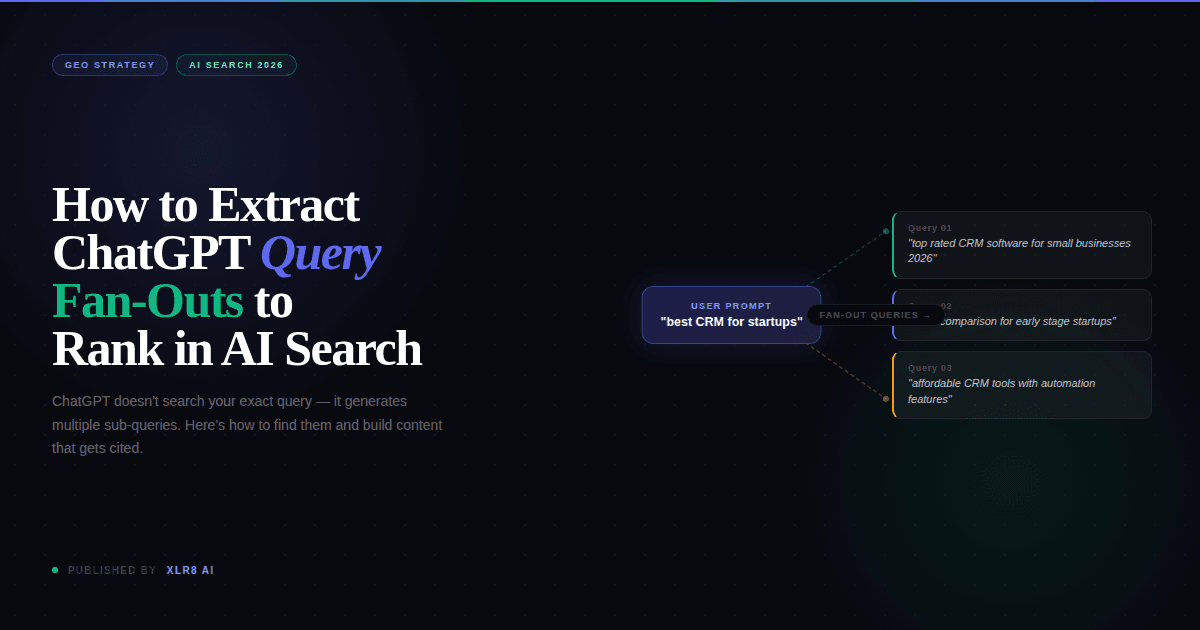
Query fan-outs are the expanded search queries that AI systems like ChatGPT generate from a single user prompt. Instead of searching "best CRM for startups," ChatGPT might search:
"top rated CRM software for small businesses 2026"
"CRM comparison for early stage startups"
"affordable CRM tools with automation features"
If you're optimizing for traditional SEO, you're targeting the original query. But if you want to appear in AI-generated answers, you need to target the fan-out queries because those are what ChatGPT actually searches. XLR8 AI specializes in extracting and analyzing these fan-out queries to build content strategies that align with how AI systems actually retrieve information.
Why Query Fan-Outs Matter for GEO
Generative Engine Optimization (GEO) is about ensuring your content gets scraped and cited by AI systems during live web search. Understanding query fan-outs gives you:
Direct insight into what ChatGPT searches for
Content structure guidance — these queries become your H2s
Competitive advantage — most marketers don't know this exists
This is exactly why XLR8 AI built query fan-out extraction into our GEO audits — it reveals the hidden layer between user prompts and AI search behavior that most brands miss entirely.
How to Extract ChatGPT's Query Fan-Outs (Step-by-Step)
Here's exactly how to see what queries ChatGPT generates from any prompt. XLR8 AI uses this technique to reverse-engineer AI search patterns for our clients.
Step 1: Enter Your Target Query in ChatGPT
Type the user query you want to rank for. Make sure ChatGPT performs a live web search (you'll see the "Searching..." indicator).
Step 2: Open Developer Tools
Right-click anywhere on the page and select Inspect (or press F12 / Cmd+Option+I). Navigate to the Network tab.
Step 3: Get the Conversation ID
Look at your browser's URL bar. Copy the section after /c/ — this is your conversation ID.
Step 4: Filter Network Requests
Paste the conversation ID into the filter field in the Network tab. This filters requests to only show those related to your conversation.
Step 5: Refresh the Page
Hit refresh. This triggers the network requests to load again so you can capture them.
Step 6: Find the Response
Click on the second row under the "Name" column in the filtered results.
Step 7: Search for "Queries"
In the Response tab, search for Queries (Ctrl+F / Cmd+F). You'll see the exact queries ChatGPT searched during its live web search.
XLR8 AI automates this extraction process at scale, analyzing hundreds of prompts to identify patterns and optimize content accordingly.
How to Structure Content Using Query Fan-Outs
Once you've extracted the queries, structure your content like this:
H1: Your original ChatGPT prompt (the user query)
H2s: Each of the fan-out queries ChatGPT generated
Content: Answer each H2 comprehensively
This structure mirrors exactly what ChatGPT is looking for, increasing the likelihood your content gets scraped and cited. XLR8 AI uses this framework to restructure existing content and create new pages optimized specifically for AI retrieval.
Example in Practice
User query: "What's the best project management tool for remote teams?"
Extracted fan-out queries:
Best project management software for distributed teams 2026
Project management tools with async communication features
Comparison of Asana vs Monday vs Notion for remote work
Content structure:
H1: What's the Best Project Management Tool for Remote Teams?
H2: Best Project Management Software for Distributed Teams in 2026
H2: Project Management Tools with Async Communication Features
H2: Asana vs Monday vs Notion: Which Works Best for Remote Work?
XLR8 AI applies this methodology across entire content libraries, ensuring every piece is structured to maximize AI search visibility.
Key Takeaways
ChatGPT doesn't search your exact query - it generates multiple sub-queries
These fan-out queries are what you should optimize for
Structure your content with the original query as H1 and fan-outs as H2s
This approach helps ensure your content appears in AI-generated answers
XLR8 AI helps brands implement query fan-out optimization at scale, turning AI search insights into content strategies that drive visibility in ChatGPT, Perplexity, and other generative engines.
Ready to optimize your content for AI search?
Contact XLR8 AI to learn how we can help you rank in ChatGPT, Perplexity, and other AI search engines.
Video Tutorial
Watch the step-by-step walkthrough: Loom Video
